Glossary
Item
Under international maintenance standards (EN 13306 & IEC 60050-192), an item is defined as any part, component, device, subsystem, functional unit, equipment, or system that can be individually identified and described. It represents the primary subject of maintenance tasks, condition monitoring, and reliability assessments. An item can consist of hardware, software, or both, with its boundaries defined by the organization’s technical indenture level.
In HeadLight Suite, the term item is used exclusively as a quantitative metric rather than an asset identifier. It serves to designate discrete counts and numerical quantities (e.g., n items) rather than physical or functional maintenance entities.
Part-number (P/N)
A Part Number (P/N) is a standardized alphanumeric identifier assigned by a manufacturer or design authority to uniquely identify a specific design, material specification, or physical model (governed by standards such as ISO 10303, MIL-STD-130, and ASD/AIA S1000D). It establishes form, fit, and function interchangeability, allowing maintenance teams to procure, stock, and replace identical components regardless of the individual physical unit.
In HeadLight Suite, the Part Number (or P/N) serves as the primary item master reference for all systems, equipment, assemblies, and spare parts. Think of a part number as the “what” — it tells you the design/type, not the individual unit
Part Numbers are defined within contracts in Headlight Admin, where they are assigned a description and a specific type (Part, Equipment, or System). Once configured, these Part Numbers can be enriched in Headlight Studio by associating them with targeted documentary resources, such as PDF manuals, checklists, maintenance procedures, troubleshooting guides, and training materials.
Serial-Number (S/N)
A Serial Number (S/N) is an alphanumeric code assigned by the manufacturer to uniquely identify a single, specific physical instance of a part or product. In maintenance operations, the serial number provides distinct individual traceability throughout the physical life cycle of a component, enabling the logging of operational hours, inspection results, calibration certificates, repair histories, and rotable rotations across multiple functional locations.
In HeadLight Suite, the Serial Number (or S/N) identifies one specific instance of a Part-Number, with its own maintenance and installation history. Think of a serial number as the “which one” — it tells you the exact individual unit.
Serial Number management requires IBM Maximo Application Suite, the CMMS integrated into the Headlight suite. Individualized equipment tracking is then handled role by role: technicians operate on specific instances via Maintenance Coach, while managerial roles supervise asset fleets and operations through Headlight Manage.
Assets
According to ISO 55000, an asset represents a maintainable entity that the organization chooses to manage, track, and maintain individually. Not every item becomes an asset. The organization decides which items are significant enough to register and manage individually in the CMMS, based on criticality, cost, and regulatory requirements.
The notion of Asset is not used in HeadLight Suite. The definition above is provided for reference only, in accordance with international standards (ISO 55000). Maintenance Coach uses the term Equipment to designate maintainable entities.
Equipment
Equipment refers to any physical, functional, or structural entity—such as a system, machine, sub-assembly, or component—deployed to perform a designated operational function and requiring scheduled or unscheduled maintenance interventions to preserve or restore its required operational readiness and reliability.
In the Headlight suite, the concept of equipment is fundamental. Each equipment represents a unique physical instance, uniquely identified by a combination of a Part Number (P/N) and a Serial Number (S/N). It acts as the core anchor point of the system, meaning all operational events and data—such as work orders, inventory management, and maintenance history—are directly associated with this specific item.
Levels of Maintenance
In HeadLight Suite, maintenance activities are structured into three standardized levels based on task complexity, required tooling, and operational location:
Organizational-Level Maintenance (OLM / O-Level)
- Location: Operational site, flight line, or workshop floor (performed directly on the asset).
- Personnel: System operators, line technicians, or front-line maintenance personnel.
- Scope: Focuses on routine preventive maintenance and rapid fault isolation to maintain immediate operational readiness. Typical tasks include pre- and post-operational inspections, scheduled servicing (cleaning, lubrication, fluid servicing), minor adjustments, and the removal and replacement of faulted Line Replaceable Units (LRUs).
- Objective: Minimize operational downtime and restore system readiness as quickly as possible.
Intermediate-Level Maintenance (ILM / I-Level)
- Location: Dedicated back-shops, regional maintenance centers, or specialized field support facilities (performed off-equipment).
- Personnel: Specialized discipline-specific technicians (avionics, hydraulics, mechanical).
- Scope: Focuses on testing, troubleshooting, and repairing LRUs that were removed during O-level interventions. Tasks include detailed diagnostic testing on test benches, precision calibration, component-level repair, and the removal and replacement of Shop Replaceable Units (SRUs) or circuit boards.
- Objective: Restore unserviceable assemblies and return them to the supply chain as serviceable stock.
Depot-Level Maintenance (DLM / D-Level)
- Location: Centralized industrial repair depots, heavy maintenance facilities, or Original Equipment Manufacturer (OEM) plants.
- Personnel: OEM engineers, industrial technicians, and manufacturing specialists.
- Scope: Represents the highest level of maintenance capability. Activities involve comprehensive system teardowns, complete overhauls, structural repairs, deep remanufacturing, engineering modifications, and modernization or life-extension programs.
- Objective: Rebuild equipment to a “like-new” (zero-hour/zero-cycle) baseline condition and execute complex repairs beyond field-level capabilities.
In HeadLight Studio, the maintenance level is defined directly at the Knowledge Base level for a given Part Number (P/N). This architecture allows a single Part Number to be linked to multiple distinct Knowledge Bases—one for each operational echelon (such as OLM, ILM, or DLM). As a result, technical writers can deliver role-specific maintenance manuals, procedures, and technical documentation precisely calibrated to the operational scope and technical permissions of each user group.
Applied Configuration
Applied Configuration (also referred to as As-Maintained or Actual Configuration) represents the exact physical, functional, and software state of an individual, serialized asset at any given point in its operational lifecycle.
Unlike the theoretical baseline (As-Designed) or the manufacturing baseline (As-Built), the applied configuration reflects the real-world condition of the specific equipment instance, tracking installed parts (Part Numbers (P/N) and Serial Numbers (S/N) currently mounted).
In the HeadLight Suite, applied configuration is managed directly in the field using Maintenance Coach. As technicians execute maintenance tasks, inspect assets, and swap components on-site, all real-time configuration updates (such as installed Part Numbers and Serial Numbers) are recorded and synchronized within IBM Maximo Application Suite (Maximo Asset Configuration Manager) to maintain an accurate As-Maintained digital twin.
Applicable Configuration
Applicable Configuration (often referred to as the Authorized Configuration, Permissible Baseline, or As-Planned Configuration) defines the complete set of approved technical baselines, modifications, and part variations authorized for installation on a specific asset or asset fleet at a given point in time.
Configuration Audit
In HeadLight Suite, configuration management operates as a continuous comparison between two states:
| Configuration Type | Question Answered | Definition |
|---|---|---|
| Applicable Configuration | What is authorized? | The theoretical, certified baseline of all allowable parts, modifications, and assemblies. |
| Applied Configuration | What is installed? | The actual, physical inventory of serial numbers and part numbers currently mounted on the equipment. |
A Configuration Audit is the systematic verification process that compares an asset’s Applied Configuration (what is physically installed and operating in the field) against its Applicable Configuration (the authorized, certified baseline defined by engineering, contracts, and regulatory bodies). Its primary purpose is to identify configuration drift, eliminate safety and compliance risks, and guarantee that the physical asset matches its digital twin in PLM and HeadLight Suite.
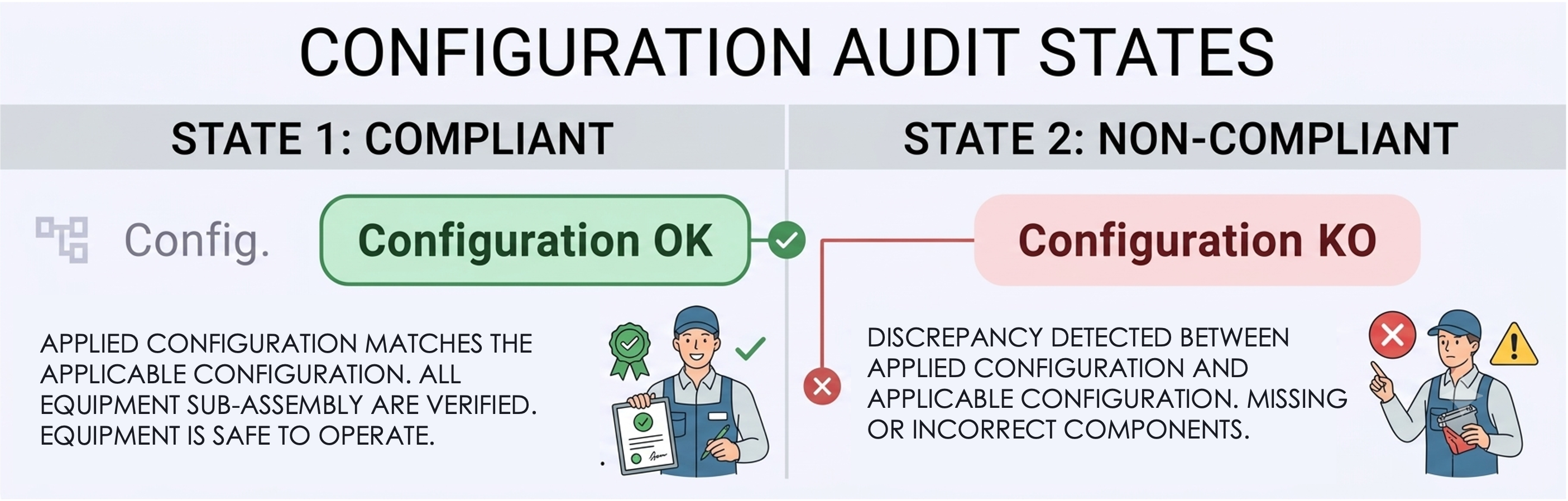
In HeadLight Suite (specifically Maximo Application Suite and Maximo Asset Configuration Manager - ACM), the configuration audit engine is driven by the Build Data Interpreter (BDI), named Configuration Status (OK / KO) in HeadLight Suite.
The Configuration Status is the real-time compliance indicator generated by Maximo after running automated rules-based comparisons between the Applicable Configuration (the engineering model) and the Applied Configuration (the actual serialized asset in the field).
The Configuration Status acts as an automated, continuous audit engine. It parses the physical asset hierarchy and compares it against pre-defined engineering rules in the master model:
- Position & Hierarchy Check: Verifies if a component is installed in an authorized slot/position in the asset’s multi-level Bill of Materials (BOM).
- Part Interchangeability & Alternate Rules: Checks whether the installed Part Number (P/N) matches the primary specification or is a pre-approved alternate for that exact slot.
Spot check
A spot check in Maintenance Coach is a quick, sample-based audit that verifies whether physical assets in the field match their digital records in IBM Maximo Application Suite.
Rather than auditing an entire facility or fleet at once, it uses random sampling or targeted checks on critical equipment to assess data accuracy in real time:
- Part Number (P/N): Confirms that the installed component is the authorized reference, revision, or approved substitute per technical specifications.
- Serial Number (S/N): Ensures individual unit traceability, which is vital for monitoring operating hours, life-limited parts (LLP), calibration cycles, and warranty claims.
Spot-checks can be performed in Maintenance Coach either manually by swiping the component’s configuration card or automatically using RFID scanning. An eye icon indicates the verification status, displaying the number of days since the individual unit was last verified.
Model
In IBM Maximo Application Suite, primarily within Maximo Manage and the Asset Configuration Manager (ACM) add-on, a Configuration Model functions as the authoritative engineering blueprint for complex, regulated assets such as aircraft, vehicles, or defense systems. It defines the rules, hierarchy, and allowable variations governing how an asset must be assembled, operated, and maintained throughout its lifecycle.
At the structural level, the model establishes a tree of logical build positions. Each build position acts as a functional slot within the asset assembly, specifying the allowable Configuration Management (CM) items, authorized part numbers, approved revisions, and interchangeable alternates. These models also embed business and engineering constraints, including mandatory sub-assemblies, part compatibility rules, and quantity limits.
The configuration model serves as the baseline for comparing the theoretical engineering design with the physical asset. Maximo distinguishes between the applicable configuration—the approved master template—and the applied configuration, which reflects the actual serialized components currently installed in the field.
The notion of Model for configuration management is invisible for users in HeadLight Suite.
Model is only visible when selecting a part number in your fleet. The Model tag is displayed on the part number card to indicate that it represents a part reference rather than an individual serial number.

Fleet
In HeadLight Suite, fleet refers to the total population of physical assets, vehicles, or equipment operated and maintained by an organization. Rather than viewing equipment in isolation, fleet-level management treats these assets as an aggregated population sharing common configuration baselines, operating profiles, and maintenance programs.
HeadLight Manage enables organizations to track global reliability metrics, orchestrate system-wide technical modifications and service bulletins, optimize spare parts provisioning, and ensure continuous compliance across all individual serialized units.
Location
OPERATING
blabla
HOLDING
blabla
STOREROOM
blabla